v7.2.0 | 09 February 2026
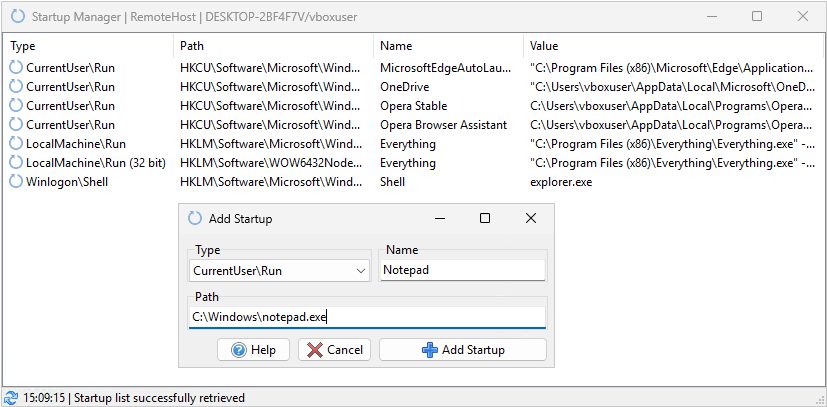
Remcos 7.2.0 introduces the new full-fledged Startup Manager function, allowing to view, edit, add and delete startup entries for any program.
The user experience has been further improved with enhanced File Manager, integrated PowerShell scripting, Real-Time Auto Refresh across key modules (File Manager, Process Manager, Window Manager, Network Monitor), a convenient Firewall Test button and updated Port Tester and Connection Tester tools for clearer diagnostics of connectivity issues.
This release also includes multiple compatibility updates and stability fixes.
🆕 New Features
- Startup Manager: The new Startup Manager function allows to view, edit, add and delete automatic startup entries for any file in the system.
- File Manager: The new Cut/Copy/Paste functions allow to quickly perform local file copies and transfers on the remote systems.
- File Manager: Added keyboard shortcut keys (also visible in the File Manager Menu), which are the same of the original Windows Explorer.
- File Manager: Added real-time Auto Refresh
- Remote Scripting: Added Powershell scripting
- User Experience: Added Firewall Test button to quickly set Remcos allow rule in firewall if necessary.
- Process Manager: Added real-time Auto Refresh
- Window Manager: Added real-time Auto Refresh
- Network Monitor: Added real-time Auto Refresh
- Window Manager: Added real-time Auto Refresh
⚙️ Improvements
- Connection Tester & Port Tester: More clear and detailed test results, separate tests for public and private networks.
- Connection Tester & Port Tester: Now also automatically runs a Firewall Test before the usual Connection Test, for better troubleshooting and diagnostics.
- Password Recovery: Added support for latest Thunderbird email client versions.
- Cookie Recovery: Added support for the new Chrome and Chromium v144 browsers.
- Whois IP: Switched to better service provider.
- Other general performance improvements and tweaks
🧱 Stability & Error Fixes
- Stability: Fixed Ping Failure access violation error happening sometimes on many disconnections/reconnections
- GeoLocation: Fixed not displaying geolocation in control center after reconnection when using View Offline Agents
- File Manager: Fixed incomplete upload leaving residual .part files on agent machine
- Connections Tab: Fixed column menu not popping up when right-clicking on column headers
- Agent Builder: Fixed invalid files being listed in builder profile list.
- Other minor fixes and improvements.
⚠️ Update Notes
- ⚠️ It is recommended to update your old agents to use the new features.
👉Full Remcos Changelog here
👉Download Remcos